

Super InfMod watch face

star
320 reviews

Everyone
info
5K+
Downloads

Everyone
Learn more



About this app
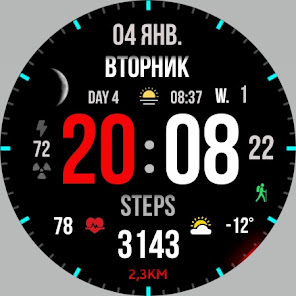
Stylish sporty watch face for every day for Wear OS
Basic moments:
- 12/24 hour digital time (depending on smartphone settings)
- A high resolution;
- Ability to change color
- Ability to change style (backgrounds)
- Custom complications
- Display the number of the day of the year
- Display the week number of the year
- Moon phases
- AOD mode (full or minimum mode)
Compatible with Wear OS devices running API level 30 and above, including Samsung Galaxy Watch 4, 5, 6, 7, 8 and Pixel Watch.
**Installation**
1. Install the watch face app on your phone.
2. Make sure your Wear OS watch is connected to your phone and uses the same Google account.
3. Select your watch as the installation device and complete the installation.
4. After installation, select the watch face from your watch face gallery.
If installation is delayed, check the internet connection on both devices, wait a minute or two, or restart your watch and try again.
**Customization**
• Touch and hold the watch face, then tap **Customize** to access the available settings.
• For the best experience, we recommend configuring the watch face directly on your watch. Video guide:
https://youtu.be/YPcpvbxABiA
**Support**
If you have any questions or installation issues, please contact: srt48rus@gmail.com
**More watch faces by WIN**
Explore other watch faces:
https://play.365securefiles.org/store/apps/dev?id=6789054753742990227
Basic moments:
- 12/24 hour digital time (depending on smartphone settings)
- A high resolution;
- Ability to change color
- Ability to change style (backgrounds)
- Custom complications
- Display the number of the day of the year
- Display the week number of the year
- Moon phases
- AOD mode (full or minimum mode)
Compatible with Wear OS devices running API level 30 and above, including Samsung Galaxy Watch 4, 5, 6, 7, 8 and Pixel Watch.
**Installation**
1. Install the watch face app on your phone.
2. Make sure your Wear OS watch is connected to your phone and uses the same Google account.
3. Select your watch as the installation device and complete the installation.
4. After installation, select the watch face from your watch face gallery.
If installation is delayed, check the internet connection on both devices, wait a minute or two, or restart your watch and try again.
**Customization**
• Touch and hold the watch face, then tap **Customize** to access the available settings.
• For the best experience, we recommend configuring the watch face directly on your watch. Video guide:
https://youtu.be/YPcpvbxABiA
**Support**
If you have any questions or installation issues, please contact: srt48rus@gmail.com
**More watch faces by WIN**
Explore other watch faces:
https://play.365securefiles.org/store/apps/dev?id=6789054753742990227
Stylish sports watchface for Wear OS
Updated on
Safety starts with understanding how developers collect and share your data. Data privacy and security practices may vary based on your use, region, and age. The developer provided this information and may update it over time.
- No data shared with third partiesLearn more about how developers declare sharing
- No data collectedLearn more about how developers declare collection


Ratings and reviews
281 reviews

Dinko Colic
- Flag inappropriate
- Show review history
November 15, 2021
Aesthetically pleasing. I'd prefer if there was some extra customisation. I don't like the moon phase using an image of the moon, it makes the otherwise simple design look cluttered. Would be cool if there was an option to enable simple mood indicator: so it's just a shape/outline. Another option could be to customize the day indicator; allow us to have a moon percentage available as an option. Finally the hour digit is not aligned to the left when it's only a single digit.
2 people found this review helpful

Andy Gold
- Flag inappropriate
July 13, 2023
Nice easy to read watch face! And, this face shows a decent amount of info too. Many watch faces have lots of info but then make the font too small to see anything. Not this one. The info is laid out in an easy to read format without being too congested and too small to read. If this watchface is like other WIN watchfaces, it will also be extremely good in regards to battery life.

Daniel Franc
- Flag inappropriate
January 6, 2022
Great watch face - nice design and all the info i need but it lacks a key element - always on display suport... for me is very important to have a minimal AOD ( hour only for example) to reduce battery usage... and another minus is lack of an phone app for customisation ... is not big deal but on other watch faces there is this thing and bring more confort
WinWatchfaces
January 7, 2022
Ok Friend next update
What’s new
Update for WearOS
- Added Backgrounds
- Fixed the operation of the heart rate monitor
- Added new colors
- Added Backgrounds
- Fixed the operation of the heart rate monitor
- Added new colors
Everyone
Learn moreApp support
About the developer
Филатов Игорь Александрович
winwatchfaces@gmail.com
ул. Ескалиева, д. 148
кв. 21
090000 Уральск
Kazakhstan


